WinCustomize has a wide variety of skins and themes for nearly every aspect of your Windows operating system. From animated wallpaper for DeskScapes all the way to skins for WindowBlinds, from cursor themes to icon packs, we are the site for finding the best themes to use with your Stardock applications. Since we have a massive amount of available downloads, we've created a guide that explains what software is needed (if any) in order to use these great skins and themes.
I’d also recommend subscribing to WinCustomize. Once you become a subscriber, you'll have access to unlimited downloads, ad-free browsing, and discounts on Master skin purchases.
Become a WinCustomize subscriber here.
Galleries
When you want to browse the galleries on WinCustomize, the "explore" button on the site is the best place to start. Clicking here will take you to an overview of our featured galleries, which showcase the most popular categories on the site. You can also get a list of the galleries by hovering over the "explore" button. If you're a WinCustomize subscriber, you can customize this menu to show only the galleries you want to see.
When you click to view a gallery in WinCustomize, the gallery you select will have a description telling you which software (if any) you need in order to use that particular download. The screenshot below highlights the description area.
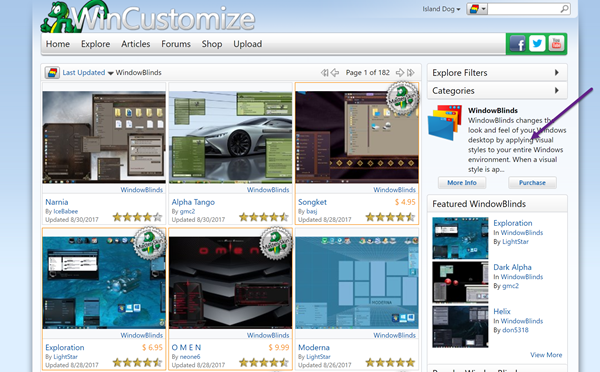
In the screenshot above, we’re looking at the WindowBlinds gallery. It gives you a brief description of the software and links to the product page required for that download. If you don’t already have that application, you can download the free trial from its site. If you are interested in customization and productivity for your desktop, I would recommend checking out Object Desktop. This is our suite of over a dozen desktop applications. You can see the benefits of being a member here.
To download a skin, just click the Download button on an individual skin page. If it is an item that requires the use of an application then read more about that below.
Software
While we have a variety of downloads available on WinCustomize, these are some of the most popular applications that users come to download skins and themes for. Click the links to find out more information about the product and to download a free trial.
Many other downloads will be contained in a .zip file, which you will need to extract once downloaded.
Master skins
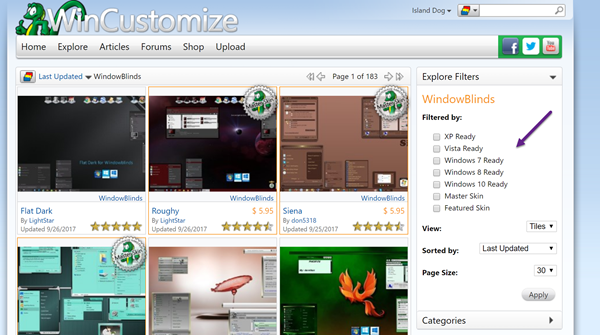
WinCustomize creators who have reached the rank of Master are able to sell their skins on WinCustomize. These premium skins are available to purchase, but if you are a WinCustomize Subscriber then you will get a 20% discount on the purchase of these skins. When browsing the galleries, Master skins will have a special badge indicating they are from a Master skinner. You can also use the filters in the galleries to only show Master skins.
Tutorials and community help
For a list of tutorials on how to use many of the Stardock apps, see here. If you have questions about the downloads on WinCustomize, or just want to come chat with the rest of our great community, be sure stop by and visit our community forums here.